
For Mac
macOS on Apple silicon
For Mac computers with an M1 chip or later. Download the DMG, open it, and move Cesium Desktop to Applications.
DMG · Apple silicon · 14 MBDownload for macOSCesium by Silvatech
Manage voter information, area activity, field teams, reports, imports, and election-day priorities from a secure Cesium instance configured for your organization and election environment.
Created in Belize. Private customer deployments. Configurable for election environments internationally.
Free desktop edition
Use a private, single-computer workspace for voter lists, Excel imports, local election marking, reports, audit history, and encrypted backup and restore.
Cesium Desktop 0.4.0 · August 2026
For Mac
For Mac computers with an M1 chip or later. Download the DMG, open it, and move Cesium Desktop to Applications.
DMG · Apple silicon · 14 MBDownload for macOSFor Windows
Use the guided EXE installer for the simplest setup. An MSI package is also available for managed installations.
EXE · Windows x64 · 11 MBDownload Windows installerDownload MSI packageAlready using 0.3.0? Open Settings and check for updates to install 0.4.0 while preserving your encrypted workspace. Earlier versions should update in sequence. OS code signing is not yet active, so macOS Gatekeeper or Windows SmartScreen may display an unknown-publisher warning.
Verify download checksumsSupplementary voter demo
The sample Excel workbook contains fictional records only. It is compatible with the Cesium 0.4.0 supplementary importer and contains 20 test records.
XLSX · 20 synthetic records · 9 KBDownload the sample Excel fileInstall Cesium Desktop and open the application.
Create your local workspace and administrator account.
Open Imports, select Supplementary, then select Skip existing records.
Choose the sample XLSX and process it. The expected result is 20 inserted and 0 failed.
Use the supplied synthetic workbook for testing. Do not use real voter data in a public demonstration.
These screens come from Cesium Desktop 0.2.0 running the synthetic San Pedro Training Desk workspace.
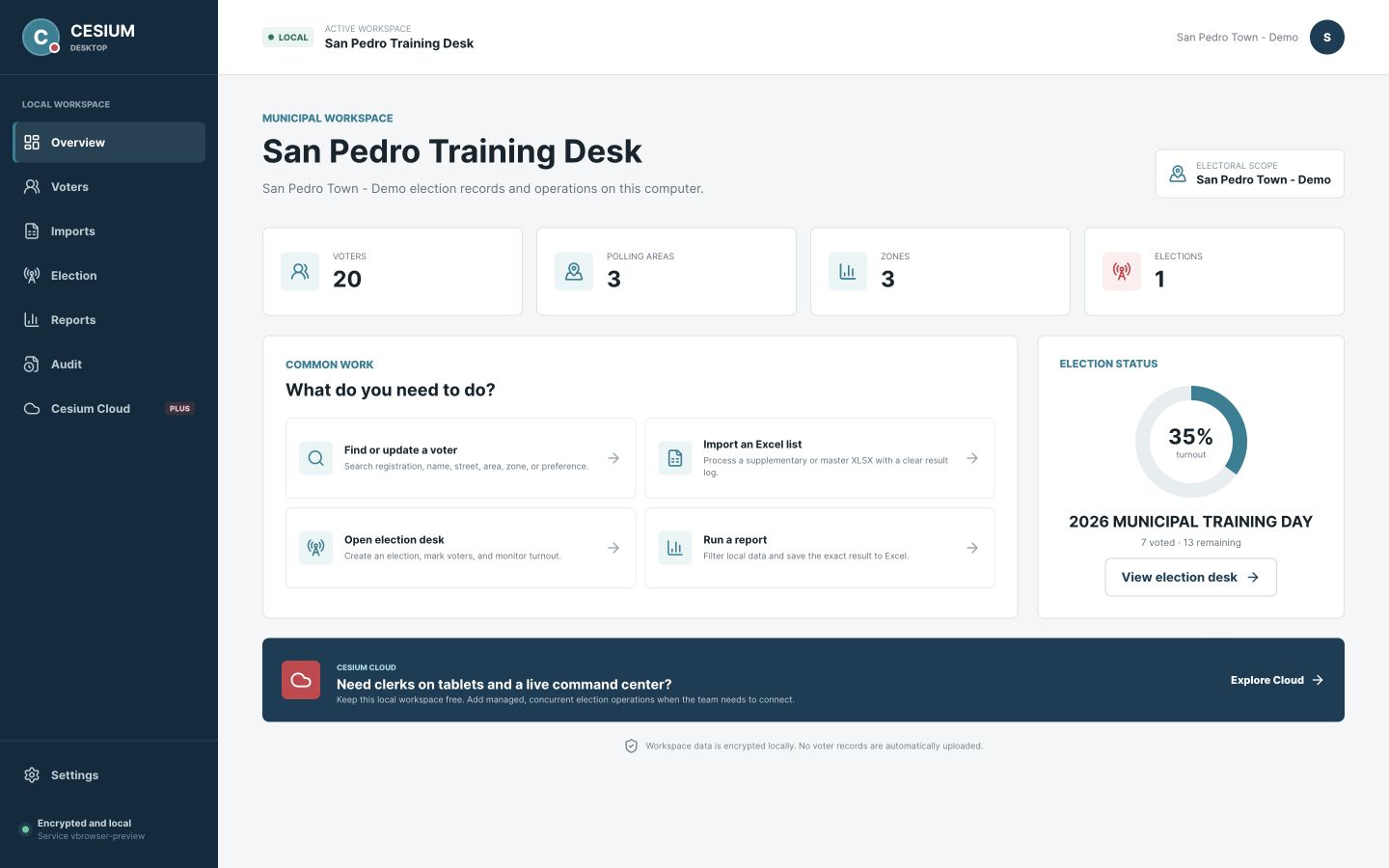
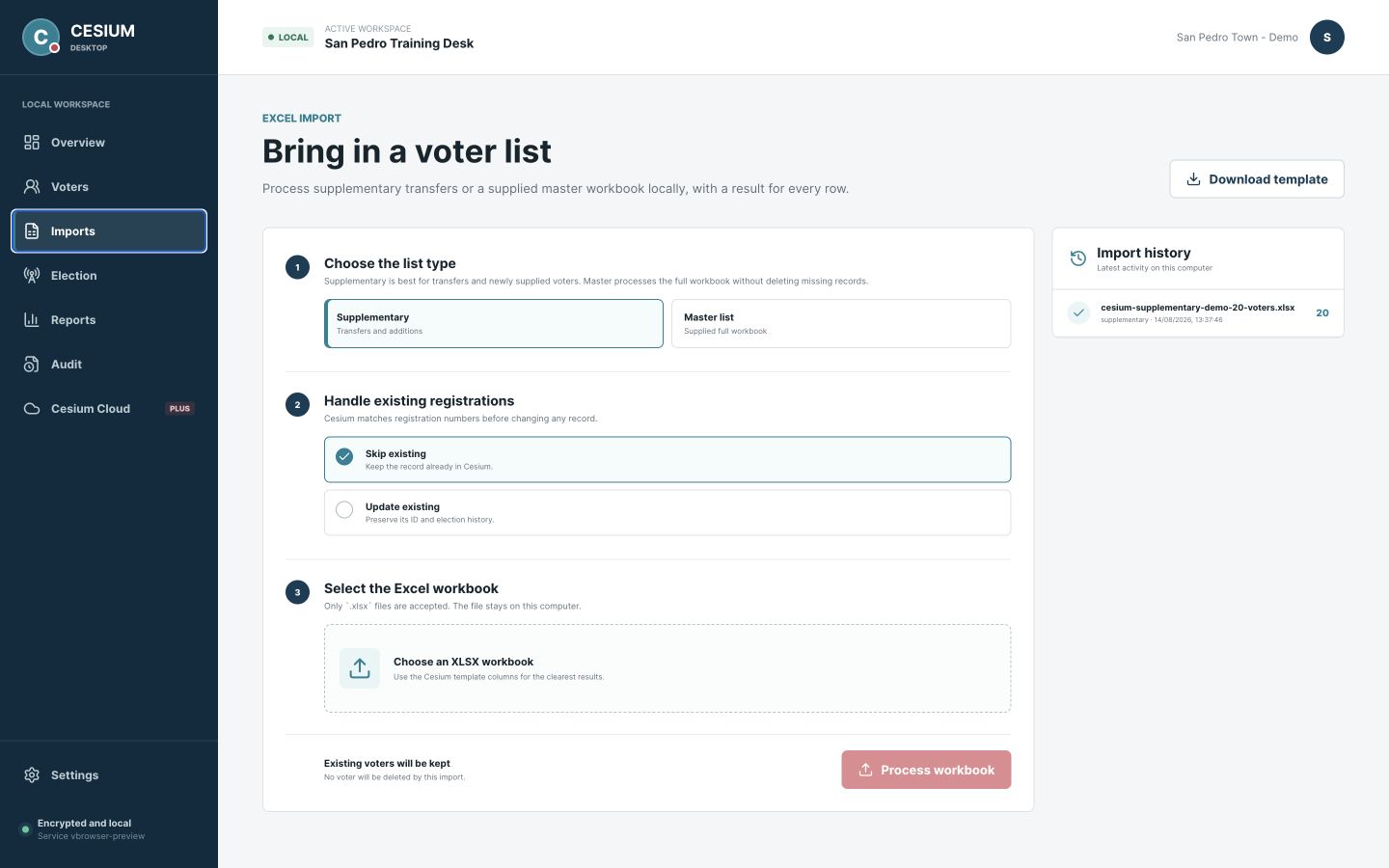
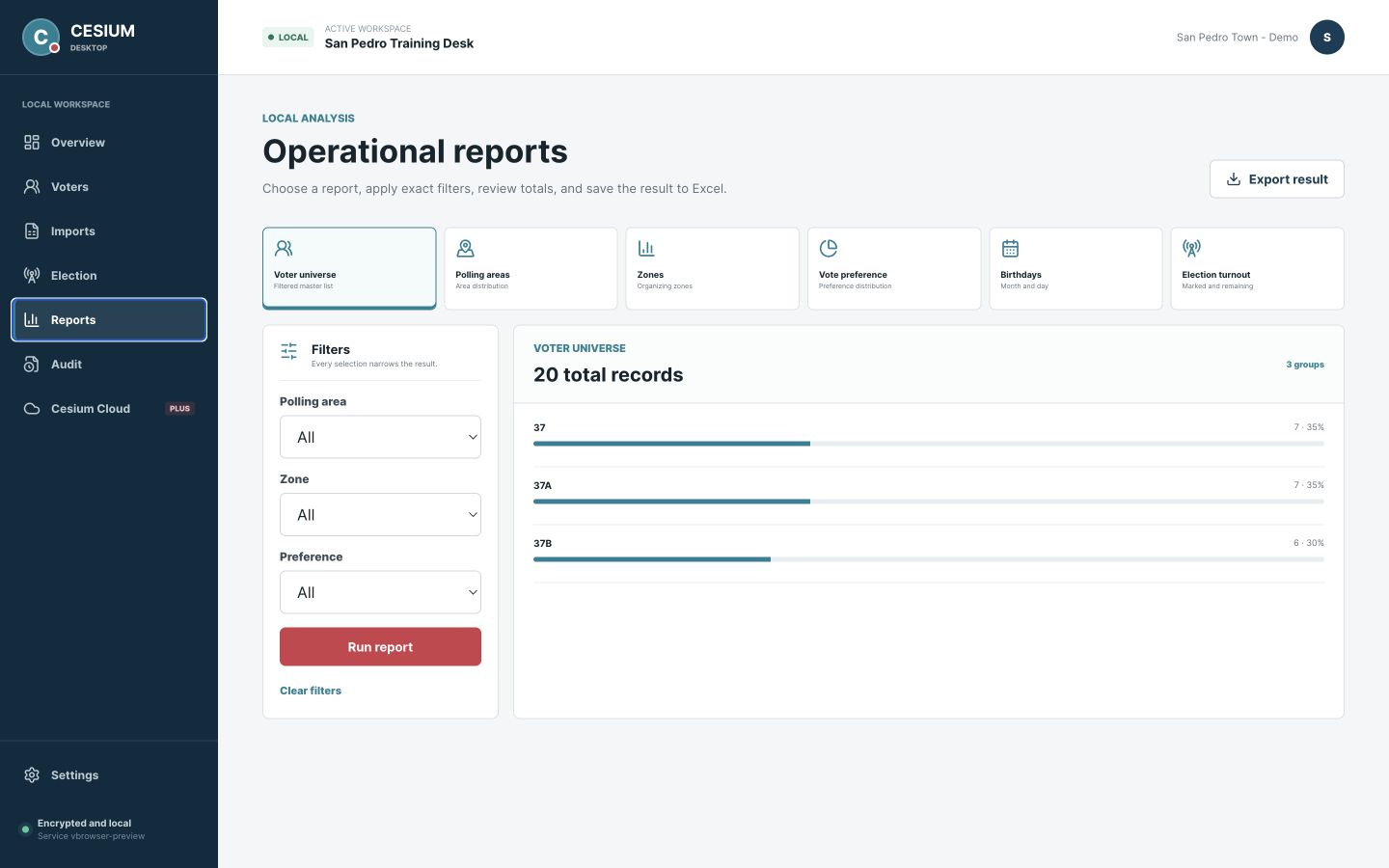
The free edition is local and designed for one computer. Cesium Cloud adds private multi-user access, realtime operations, managed backups, support, and optional AI assistance.
Created in Belize · Ready internationally
Cesium originated in Belize and reflects the realities of field-led election and campaign operations. It is not locked to Belizean structures: Silvatech can configure the geography, terminology, roles, voter-file fields, permissions, reports, languages, and operating procedures for teams in other countries.
Discuss Cesium for your countryMap constituencies, districts, divisions, wards, precincts, municipalities, or the equivalent operating areas in your country.
Configure role names, approvals, reports, languages, field procedures, and command views around the way your team works.
Scope hosting, access controls, imports, support, and data boundaries for each customer and jurisdiction.
International readiness is not a one-size-fits-all claim. Every deployment begins with discovery, data mapping, and a review of local operational and legal requirements.
Public demo access
Every voter, event, report, notification, and import is synthetic. Demo changes are simulated in the browser and are not connected to customer systems or persisted.
demo@silvatech.bzCesiumDemo2026!demo2026Product proof
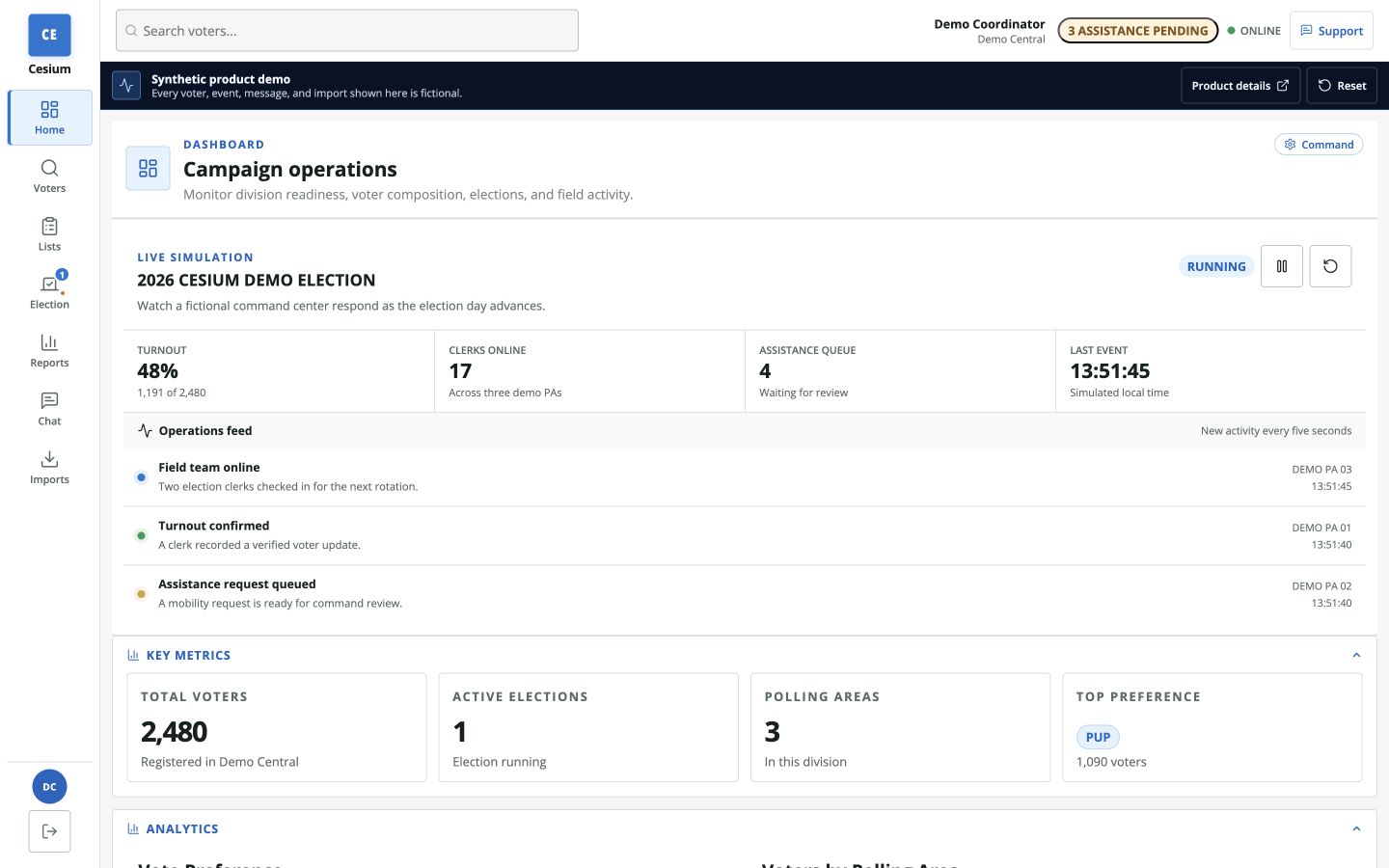
Move through the real interface using a public environment built entirely from fictional data and simulated activity.
Synthetic product demo
See simulated turnout, active clerks, priority polling areas, and field events in one command view.
Open the command dashboardRole journeys
Cesium gives each role a focused path while keeping the wider operation visible to authorized command and administrative teams.
Field teams
Clerks and coordinators get a focused workflow for the polling areas and tasks assigned to them.
Municipal scope: a municipality can work within the relevant polling areas of a parent electoral division while retaining municipal administrative access.
Launch process
Silvatech prepares the private environment, configures roles and permissions, validates imports, runs launch checks, and can provide optional election-day support.
Confirm operating area, administrators, roles, and access rules.
Configure the private environment and base permissions.
Bring the approved Excel voter file into the validation workflow.
Review exceptions, duplicates, access, and operational reports.
Complete login, field workflow, command-view, and reporting checks.
Add monitoring and optional election-day support around the operation.
Operational trust
Customer deployments are planned around clear data boundaries, controlled access, operational history, and recovery expectations.
Customer instances do not share campaign databases or operational credentials.
Users receive access based on their approved role and operating scope.
Deployment credentials and configuration stay inside each customer boundary.
HTTPS and authenticated realtime updates support operational workflows.
Administrators can review important actions and import processing history.
Launch planning includes backup, recovery, and rollback expectations.
Cesium supports private campaign and election operations. It is not presented as an official public vote-counting, vote-tabulation, or election-authority system.
Deployment options
Every customer deployment is privately scoped. The public demo is product proof, not a shared customer environment.
Cesium deployment
A private operating workspace for one constituency, district, division, ward, or equivalent local team.
Cesium deployment
Local operations across the polling areas or precincts relevant to a municipality or equivalent jurisdiction.
Cesium deployment
Cross-area visibility and governance for a larger command team.
FAQ
Yes. Cesium originated in Belize, but its geographic structures, terminology, roles, voter-file fields, permissions, reports, languages, and workflows can be configured for private election and campaign operations in other countries. Each deployment starts with discovery and a review of local operational and legal requirements.
Yes. Each contracted organization receives a separate environment, data boundary, secrets, users, and domain configuration.
Yes. A municipality can operate within the relevant polling areas of a parent electoral division while retaining its own administrative scope.
Yes. Cesium supports Excel imports, validation, duplicate handling, review of exceptions, and operator-friendly processing history.
Yes. Field workflows are designed for phones and tablets, while command and administrative views use the additional space available on larger screens.
Yes. Customer deployments are separately configured with their own environment, data, access controls, secrets, and operational boundary.
Silvatech can scope launch checks, monitoring, standby support, issue triage, and post-event reporting around the needs of the organization.
Private walkthrough
Bring your country or operating area, voter-file format, roles, reporting needs, and support expectations. Silvatech will map the right Cesium deployment.